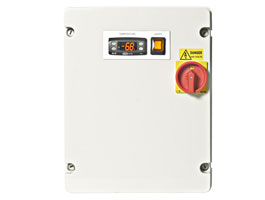
GB Controls panels use Eliwell controllers, so the codes on the display are Eliwell's. On an EWNext-based panel, E1 means the cold room probe Pb1 has failed, E2 the defrost probe Pb2 and E3 the third probe Pb3. AH1 and AL1 are high and low temperature alarms, oPd is an open door alarm and PAL a pressure switch lock-out that needs a manual reset.
GB Controls, based in Nelson, Lancashire, builds refrigeration control panels and names the Eliwell EWNext controller in its current range. It does not publish its own code list, so the tables below come from Eliwell's manuals. Some older lists say E1 means "defrost in progress" or that E4 to E7 are alarms. Those meanings do not appear in Eliwell's manuals.
At a glance
| Code | What Eliwell says it means | Reset |
|---|---|---|
| E1 | Probe Pb1 error (cold room) | Automatic once the probe works |
| E2 | Probe Pb2 error (defrost), on models with Pb2 | Automatic |
| E3 | Probe Pb3 error, on models with Pb3 | Automatic |
| AH1 | Alarm due to Pb1 high temperature | Automatic |
| AL1 | Alarm due to Pb1 low temperature | Automatic |
| oPd | Open door alarm | Automatic when the door closes |
| PAL | Pressure switch alarm, maximum activations reached | Manual |
Source: Eliwell EWNext Performance user manual, alarms table.
GB Controls and Eliwell
GB Controls' page on its EWNext based control panels introduces the Eliwell EWNext controller, an optional HACCP module and the Eliwell AIR mobile app. The panel is GB Controls' design, but the display, the codes and the alarm logic come from the Eliwell controller inside it. That is why the place to look up a code is Eliwell's manual, and why our Eliwell error code guide applies to these panels too.
EWNext alarm codes
These come from Eliwell's EWNext Performance user manual.
| Code | What Eliwell says it means | What happens | Reset |
|---|---|---|---|
| E1 | Probe Pb1 error: probe or wiring short-circuited or open | Max and min temperature alarms disabled. Compressor runs on the Ont and OFt parameters | Automatic |
| E2 | Probe Pb2 error (models that manage Pb2) | Defrost ends on time | Automatic |
| E3 | Probe Pb3 error (models that manage Pb3) | Automatic | |
| AH1 | Alarm due to Pb1 high temperature | No effect on regulation | Automatic |
| AL1 | Alarm due to Pb1 low temperature | No effect on regulation | Automatic |
| EA | External alarm from a digital input | Depends on settings | Automatic once the external cause is removed |
| oPd | Open door alarm | Recorded in the AL folder | Automatic. Close the door |
| Ad2 | Defrost due to timeout (models that manage Pb2) | Alarm relay not active | Automatic at the next defrost |
| CoH | Overheating alarm: Pb3 above the SA3 setting | Compressor inhibited | Automatic once the temperature falls |
| rFA | Low refrigerant alarm: with the compressor on, the temperature does not fall as expected | Recorded in the AL folder | Switch the instrument off and on |
| nPA | Pressure switch alarm, with the number of activations | Compressor inhibited | Automatic |
| PAL | Pressure switch alarm, maximum number of activations reached | Compressor and defrost inhibited | Manual: switch off and on, or select rAP in the functions folder |
Eliwell notes that high and low temperature alarms are excluded during a defrost, and that if alarm exclusion times have been set, an alarm will not be signalled during them.
E1 on a GB Controls panel
E1 is a probe fault, not a defrost or status message. The controller cannot read the cold room probe, so it switches off its own high and low temperature alarms and runs the compressor on a fixed on and off cycle until the probe is fixed. The room keeps some cooling, but no alarm will warn you if it drifts, so check the stock with a separate thermometer and call an engineer. Eliwell's remedy is to check the probe type setting, check the wiring and replace the probe.
rFA: low refrigerant
rFA is worth knowing because it is easy to dismiss. Eliwell says it appears when, even with the compressor running, the temperature does not fall within the interval set in the controller. Switching the controller off and on clears the alarm, but a room that will not pull down with the compressor running often points to a refrigerant leak, which needs an engineer with the F gas qualifications set out by GOV.UK.
Older Eliwell controllers
If your panel has an older Eliwell controller, the core codes are largely the same. Eliwell's EWPlus 974 manual, for example, uses E1, E2 and E3 for probe faults, AH1 and AL1 for high and low temperature alarms, Ad2 for a defrost ended on timeout, and COH for an overheating alarm that locks the compressor. On the EWPlus 974, Eliwell says an E2 also makes the evaporator fans run on a duty cycle.
How to silence and reset an alarm
- Silence. Eliwell says pressing any key silences the buzzer, if fitted, makes the alarm icon flash and de-energises the alarm relay.
- Automatic reset. Eliwell says all alarms clear automatically once their cause is removed, apart from the pressure switch alarm.
- PAL. Switch the controller off and on again, or select rAP in the functions folder.
- Checking the alarm list. On the EWPlus 974, pressing and releasing set opens the Machine Status menu. If no alarms are active, SEt appears.
What you can check safely
- The door. oPd and AH1 often follow a door left open.
- The stock. With E1 or rFA, check the product temperature with a separate thermometer.
- The condenser. CoH means the probe 3 temperature, often the condenser, is too high. Check it is not blocked and the plant room is not unusually hot.
Safety
Eliwell's manuals warn of the hazard of electric shock, explosion, fire or arc flash, and say to disconnect all power before removing covers or working on wiring, and never to disassemble, repair or modify the equipment. They say Schneider Electric products, which include Eliwell, should be installed, operated, serviced and maintained only by qualified personnel. A control panel carries mains voltage, so leave anything behind the cover to an engineer.
When to call an engineer
- E1, E2 or E3, which mean a failed probe or wiring.
- PAL, or nPA that keeps coming back.
- rFA, especially if the room is slow to pull down.
- CoH that returns after the condenser has been checked.
- AH1 that returns with the door shut and a normal load.
Our cold room repair team works on cold rooms with GB Controls panels across London, and our cold room diagnostic guide walks through what an engineer checks.
Questions people ask about GB Controls panels
What does E1 mean on a GB Controls panel?
E1 means the cold room probe Pb1 has failed or its wiring is open or shorted. The controller runs the compressor on a timed cycle and disables its temperature alarms until the probe is fixed, so it needs an engineer.
Does GB Controls have its own error codes?
No list from GB Controls was found. Its panels use Eliwell controllers, so the codes on the display are Eliwell's, set out in Eliwell's manuals.
What does PAL mean on a GB Controls panel?
PAL is a pressure switch alarm that has reached the maximum number of activations, so the compressor and defrost are locked out. Reset it by switching the controller off and on, or with rAP in the functions folder, once the cause has been dealt with.
What does AH1 mean on a cold room controller?
AH1 is the high temperature alarm on Eliwell controllers: the cold room probe has read above the high alarm limit for longer than the set delay. It does not change how the controller runs, and it clears when the temperature returns to normal.
What does rFA mean on an Eliwell EWNext?
rFA is a low refrigerant alarm. It appears when the temperature does not fall as expected with the compressor running. Switching off and on clears it, but the cause, often a leak, needs an engineer.
How do I silence a GB Controls alarm?
Press any key. The buzzer stops and the alarm relay de-energises, but the alarm icon keeps flashing until the cause clears.
Keeping a GB Controls cold room running
Read the code against Eliwell's tables, deal with the door and the condenser first, and remember that probe faults and pressure lock-outs need an engineer. Planned refrigeration maintenance catches failing probes and dirty condensers before they trigger an alarm.
Last updated: 4 November 2026

Written by
Ali Elm
Ali is the Head of Operations at Be Cool Refrigeration with over a decade of hands-on experience in HVAC and commercial refrigeration. He oversees every installation, repair, and maintenance project, making sure the work meets the highest standards. Ali holds full F-Gas certification and has worked across residential, commercial, and industrial refrigeration systems throughout London and the South East. When he is not on site, he writes these guides to help business owners and homeowners understand their cooling systems better.